Quick answer
Do I need a photo for an Australian ETA?
No printed or uploaded photo is needed for an Australian ETA (subclass 601). The Home Affairs AustralianETA app scans your passport, reads its chip using your phone's NFC and takes a live photo of your face. The service charge is AUD 20, and heavy-rimmed glasses may need to come off.
Visitors from ETA-eligible countries, such as the US, Canada, the UK, Japan, Singapore and Malaysia, apply for an Australian ETA (subclass 601) in the official AustralianETA app. The app scans your passport, reads its chip and takes a live photo of your face. You do not need a printed or uploaded passport photo.
How to complete the ETA app face check
- Scan your passport. The app photographs the data page of your passport.
- Read the chip. Hold your phone against the passport so the app can read its chip. Your phone must have NFC, or you cannot continue.
- Take a live photo. The app captures your face to confirm that you are the passport holder.
| Photo | Live face photo taken in the app |
|---|---|
| Background | Plain |
| Lighting | Good light on your face, no direct overhead lighting |
| Pose | Face the camera |
| Glasses | Allowed, but heavy-rimmed frames may need to come off |
| Phone | NFC-enabled, to read the passport chip |
| Fee | AUD 20 service charge, non-refundable |
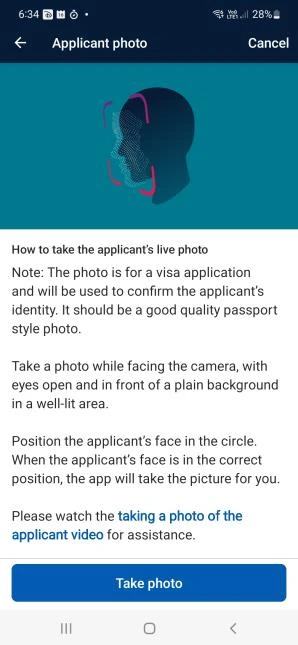
Tips for the live photo
Do
- Stand in front of a plain wall in even, natural light
- Hold the phone at eye level and look straight at it
- Remove heavy-rimmed glasses if the match fails
Don't
- Stand under a ceiling light that casts shadows on your face
- Use a busy background or have other people in shot
- Wear a hat or anything covering your face


Who can apply
- Holders of an ETA-eligible passport, applying from outside Australia.
- One application covers one person, so each family member needs their own.
- An ETA is linked to the passport you used and cannot be moved to a new passport.
European passport holders can also apply for a free eVisitor (subclass 651) in ImmiAccount instead. Visitors who are not eligible for either apply for a visitor visa, which may need an Australian visa photo or biometrics.
Australian ETA photo FAQ
No. The AustralianETA app takes a live photo of your face during the application, so you do not upload or print a passport photo.
Yes, but Home Affairs warns that heavy-rimmed glasses can make the face check difficult. If the app cannot match your face, take them off and try again.
The app reads the chip in your passport. If your phone does not have NFC, you cannot continue the application.
The ETA service charge is AUD 20 and is not refundable.
Official sources
- Home Affairs: Electronic Travel Authority (subclass 601)
- Home Affairs: AustralianETA app FAQs
- Home Affairs: AustralianETA app industry guidance (PDF)
- Home Affairs: eVisitor (subclass 651)
Last checked . Requirements and fees can change, so always confirm with the issuing agency before you apply. This site is independent and not affiliated with any government agency.